Mittwoch, 15. Juli 2015

How to compress a video for free (make the file size smaller) / Wie komprimiere ich gratis ein Video (mache die Datei kleiner) ???

How to compress a video for free (make the file size smaller) / Wie komprimiere ich gratis ein Video (mache die Datei kleiner) ???


  1. Upload your video to Youtube:  https://www.youtube.com/upload (as private or not listed, so nobody else can see ....)
  2. Go to your videos / Video Manager: https://www.youtube.com/my_videos?o=U
  3. Right of your video there's an "edit" button and an arrow down. Click on the arrow and choose "download MP4". 
  4. Thats's it because Youtube will compress your file anyway. Of course you can't expect exactly same quality, but it's still OK for most cases and it's really much smaller file size.
Enjoy

========================================================================

Translated to german by Google Translater


  1. Laden Sie Ihr Video auf Youtube: https://www.youtube.com/upload (private oder nicht aufgeführt, so dass niemand sonst sehen kann ....)
  2. Gehen Sie zu Ihrem Videos / Video Manager: https://www.youtube.com/my_videos?o=U
  3. Rechts des Videos gibt es eine Schaltfläche "Bearbeiten" und ein Pfeil nach unten. Klicken Sie auf den Pfeil, und wählen Sie "Download MP4".
  4. Das ist, dann deshalb, weil Youtube Ihre Datei trotzdem zu komprimieren. Natürlich kann man nicht erwarten exakt gleiche Qualität, aber es ist noch OK für die meisten Fälle und es ist wirklich viel kleiner Dateigröße.


Montag, 13. Juli 2015

Wie verbinde ich ein ReadyNAS (Duo) NAS als Netzlaufwerk unter Window 7 / How to connect a ReadyNAS Network drive with Win 7

Wie verbinde ich ein ReadyNAS (Duo) NAS als Netzlaufwerk unter Window 7 

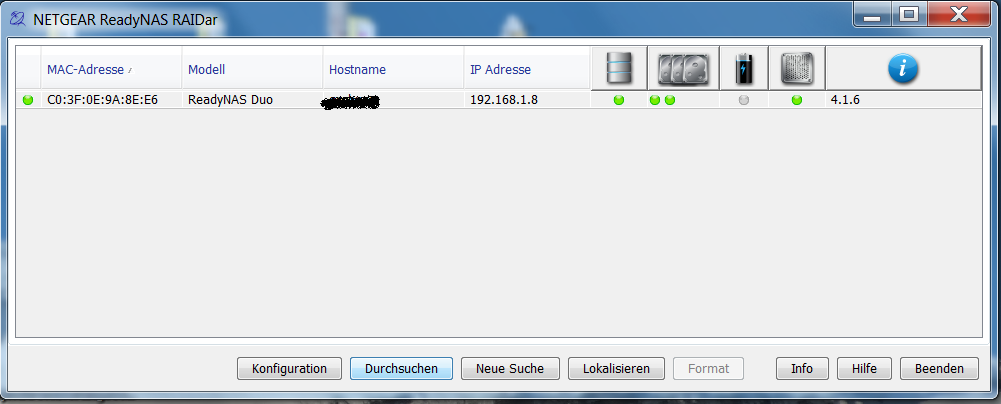
Windows-Taste drücken und nach Raidar (Programm) suchen und dann dieses starten:


Auf das gefundene NAS klicken und auf 'durchsuchen' klicken:


Von den angezeigten Shares, das gewünschte 1x anklicken und mit rechter Maustaste 'Netzlaufwerk verbinden' klicken.


Nun nochmals bestätigen bzw. die Optionen für die Anmeldung anpassen:


Somit sollte das gewünschte Share / Folder jedes Mal unter dem gewählten Laufwerkbuchstaben angezeigt werden.


Mittwoch, 17. Juni 2015

How to move photos from Android to Google Drive (to save space) and backup them on Google Photos?

How to move photos from Android to Google Drive (to save space) and backup them on Google Photos?

If you use Autosync for Google Drive to move photos from your Android phone to your Google Drive to safe space on your phone and not to loose them your problem could be that this happens before Google Photo can backup them on the cloud (Picasa, Google+, Google Photos).

How to prevent this? I've found my own solution which I've never seen on the web:

The problem: Autosync for Google Drive uses the Google Drive as destination to safe your photos, but you can't select a specific folder on the Google Drive to backup photos on Google Photos. Just either all or nothing and you probably don't want all the pictures from Google Drive on Google Photos - like me.

First I tried with a local folder and a shortcut to my local copy of Google Drive on my PC, but obviously this was either not enough or Google recognized my cheating and ignored this. 

My second attempt was to map the target folder of Autosync for Google Drive as a network drive


and add this drive to the source folders in the settings of the Google Photos Backup Program:


Obviously Google accepted this and now it works just great!

Hope you get same success.

GLHF


Freitag, 5. Juni 2015

Convert PDF to Word (Doc / Docx) for free (no Virus, Adware, Spam)

https://www.freepdfconvert.com/pdf-word

Pros:

  • Best conversion I've ever seen (even frames)

Limitation

  • Free account allows only one conversion every 30 Mins. 


Dienstag, 2. Juni 2015

Speicherkarte voll bei Eye-Fi X2 Karte / Eye-Fi card memory full

I had this problem and Eye-Fi support was not able to help, but now I've found the cause of the problem. Some month ago I've started to save photos as JPG AND RAW (not only JPG) on my Nikon D5100. I guess that's why the Eye-Fi software was not copying / deleting the RAW files and the SD card filled up.

Hope it works for you as well!