Sonntag, 9. Oktober 2016

Sony Smartwatch for Android 4.3 - Lime quick review (2016)

Sony Smartwatch for Android 4.3 - Lime quick review (2016)


It's not a brand new watch on the market, but since the price dropped dramatically it's almost a steal now. The functions are still great with standalone GPS and WiFi. Far beyond average and it's even waterproof as long as you keep the seal tight. Battery life is about good average and usually it's enough to charge it once a day, at least with WiFi and GPS off and only Bluetooth on, which is usually enough to get all the notifications and enable 90% of the functions.
I big plus are the standard Micro USB plug and the "always-on" display, but unfortunately the 'idle' watch-face is very dimmed and sometimes hard so see - especially when wearing glasses, but usually it's OK and you can switch to large letters on the screen which helps a lot.
Also great is the large available storage (about 4 GB). It's almost impossible to fill it completely.
It works grat with lots of very important apps, like WhatsApp, Shazam, Google Fit, GPS Trackers, Glympse, Hangout, Google Maps, Voice recorder and others. Unfortunately most of the apps are not working 'stand-alone'. Only a few like timer, alarm, calculator and so on. I also would like to have a 'stand-alone' sleep tracker, but it does not seem to be available.
Voice recognition to set timer, alarm, respond to text messages and so on works mostly fine, but not perfect.
Unfortunately the glass seems to be not very strong (no gorilla glass) and so you have to protect it with a screen protector. This is a must. Backside of the watch is stainless steel and way better quality than the no-name Chinese smartwatches.
The watch-band is very secure and flexible.
I only miss a camera, a speaker and maybe a heart rate monitor, but as far as I know, there is no Android Wear Watch with a camera anyway.


  • Summary
    • Good
      • currently very nice price
      • quite stable connection to the mobile phone
      • great performance (quad core and obviously enough memory)
      • always-on screen
      • above average battery live
      • WiFi (after upgrading to 5.1.1)
      • GPS
      • waterproof
      • very responsive touch-screen, but as far as I was able to soo there's no multi - touch - at least no app is supporting it
      • standard micro USB plug
      • sturdy
      • nice design
      • great viewing angles on 'active screen'
    • Bad
      • No camera (same on all other Android Wear Watches too)
      • No speaker 
      • Dim Idle 'Always-On' screen
      • somehow difficult to plug-in micro USB
      • no sim-card (same on all other Android Wear Watches too)
  • Bottom line: 
    • Best value on the Android Wear market in 2016
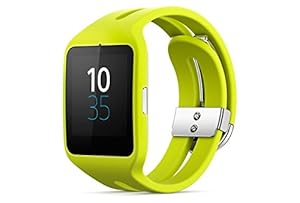


Image result for Sony Smartwatch for Android 4.3 - Lime quick review

Mittwoch, 5. Oktober 2016

How to get rid of One Drive / OneDrive?


 How to uninstall One Drive from Windows 10?


  1. Open Command Prompt in Administrator mode:
  2. Press key and type "cmd". Right-click on the icon and chose "run as administrator"
  3. Type in taskkill /f /im OneDrive.exe to terminate any OneDrive processes and hit Enter.
  4. Then type in either %SystemRoot%\System32\OneDriveSetup.exe /uninstallif you’re using 32-bit Windows 10 or %SystemRoot%\SysWOW64\OneDriveSetup.exe /uninstall if you’re using 64-bit Windows 10 and hit Enter.

Montag, 3. Oktober 2016

Important Links for Sony Smartwatch 3 SW3

Important Links for Sony Smartwatch 3 SW3


Userguide:
http://support.sonymobile.com/global-en/swr50/userguide/

Update / Repair Software / Firmware (5.1.1):
http://support.sonymobile.com/global-en/tools/xperia-companion/


Sonntag, 25. September 2016

How to get your Windows 10 Product Key / Serial?

How to get your Windows 10 Product Key?

  • Win+X and then press A  (starts command window as admin)
  • Type "slmgr -dli" and press
  • Wait a few seconds till small window with Product Key will be shown like this:


... but actually you don't need it because Microsoft registers your has value on their database and will find your PC as soon as your (re-)setup again. 

That's it

Have fun


Samstag, 17. September 2016

How to upgrade Win 7 32 bit to Win 10 64 Bit for Free after 29 July 2016?

How to upgrade Windows 7 32 bit to Windows 10 64 Bit for Free after 29 July 2016?

Problems:

    - Free Win10 upgrade is actually closed
    - 32 Bit to 64 Bit is never a provided upgrade function from Microsoft
    - If you don t want to upgrade to 64 bit - just use the Microsoft page for "assistive technologies", which still 
      provides the FREE upgrade to Win10

Solution:

-   Have a  (min) 4 GB USB stick ready
-   Download Product Key Viewer and write down product key:    
     http://www.chip.de/downloads/Windows-Product-Key-Viewer_58663752.html
-   Download ISO file to HD (function "bootable USB" will not work):
    https://www.microsoft.com/en-us/software-download/windows10/
-   Download old "bootable USB from ISO" tool from Microsoft:      
    https://www.microsoft.com/en-us/download/windows-usb-dvd-download-tool#installation
-   Run this tool and select ISO from HD to create bootable USB stick
-   Reboot PC which you will update and press F2 for Bios setup
-   Goto Boot Setup and move USB to first position
-   Plug prepared USB stick and save / reboot
-   Enter Key from Key Viewer
-   keep going and select "Custom Setup" (everything will be deleted)
-   Chose Keyboard / Language
-   Windows will start setup and count up from 0% to 100%
-   IMPORTANT: when on 100% remove USB stick before Windows is rebooting -
    otherwise installation will loop  ;-)
-   Keep going with the rest of the set-up (which is very easy and straight forward)
-   ENJOY

Samstag, 27. August 2016

Comparison between free backup tools (especially Synchronization between NAS and external HD on a PC automatically)

Comparison between free backup tools (especially Synchronization between NAS and external HD on a PC)


  1. Microsoft SyncToy (32 Bit)
    • Link: http://www.chip.de/downloads/Microsoft-SyncToy-32-Bit_16328203.html
    • Pro: 
      • supports net drives like NAS
      • nice gui with great option - everything is there - even a contribute option, which means 'update' left to right with no deletes.
    • Con
      • no built in scheduler
      • Get stuck after a few minutes even with deselected system and hidden files
    • verdict
      • completely useless
  2. FreeFileSync 
    • Link:  
      • http://www.chip.de/downloads/FreeFileSync_38472922.html
      • https://sourceforge.net/projects/freefilesync/
    • Pro
      • Very nice and informative GUI (incl. 'time remaining' which is very rare)
      • Very reliable
      • Errors (like file in use) can be selected as to be ignored and backup will continue
      • Very low memory and cpu consumption 
      • Pause function (very rare!)
    • Con
      • comes with open candy / Malware which has to be deselected on every install and update 
      • No built in scheduler
      • cannot read files in use (but Chip.de states it should be possible - I'll have to check)
    • Verdict
      • Best free sync tool if the open candy threat doesn't bother you
  3.  "Create Synchronicity"
    • Link: http://www.chip.de/downloads/Create-Synchronicity_55667266.html
    • Pro: 
      • Supports net drives
      • all needed options available
      • no adware
    • Con:
      • very slow
      • almost no runtime information
      • path length limited to 260 char which is a 'killer' 
    • Verdict:
      • NO GO because of the limitation in path lenght
  4. Synchredible 
    • Link: 
      • ttp://www.chip.de/downloads/Synchredible_14587027.html
    • Pro:
      • Nice GUI, Fest, Reliable
      • Really free
    • Con:
      • Not much runtime information - no estimated time
      • No easy setup - quite complex and somehow confusing
    • Verdict
      • Better to use BackupMaker from same company
  5. "SyncBackFree"
    • Link
      • http://www.chip.de/downloads/SyncBack-Freeware_42231473.html
    • Pro
      • Very nice GUI
      • Great options and self guiding / explaining
      • Very stable
      • Simulation mode
      • 'simple' and 'expert' mode
      • Built in scheduler
    • Con
      • No support for locked files in free version
      • No pause function
      • No incremental backups
    • Verdict
      • no incremental backup = NOGO
  6. Fbackup 6.1 
    • Link:
      • http://www.chip.de/downloads/FBackup_37492501.html
    • Pro
      • Nice setup guide
    • Con
      • No network drives allowed
    • Verdict
      • No network drives allowed
  7. BackupMaker
    • Link
      • https://www.ascomp.de/en/products/show/product/backupmaker/tab/details
      • http://www.chip.de/downloads/BackUp-Maker_13005918.html
    • Pro
      • Copy of files in use for about 16 USD possible
      • One of the easiest setups
      • Multiple folders / drives selectable in only one profile / batch
      • e-mail notification
    • Con
      • no copy of files in use in free version
      • Not much runtime info (after 4 hours (!!!) still just saying 'reading' and 0%)
      • ad after every run will be displayed
    • Verdict
      • If it would work - functions would be great
  8. Personal Backup 5
    • Link:
      • http://www.chip.de/downloads/Personal-Backup_13007706.html
    • Pro:
      • has all the functions for free - even scheduler
    • Con
      • does not copy everything. needs up to 20 reruns to catch everything
    • Verdict
      • nogo for a backup program, that does not copy everything
  9. ??????????
    • Link
    • Pro
    • Con
    • Verdict
  10. ??????????
    • Link
    • Pro
    • Con
    • Verdict


          Final recommendation
          • There's no perfect free backup tool available and even lots of people are complaining about paid applications like Backup4All. Best results will be probably achieved by FreeFileSync, but be careful to deselect OpenCandy software and you have to use create a batch job trigger that with the windows scheduler to run every night

          Montag, 1. August 2016

          sinw_battery_service adware on Android Lemfo LEM3

          Is "sinw_battery_service" a preinstalled adware on Lemfo LEM3 (Android 5.1)?


          I've tried to remove with Lookout Security ....


          ... but it was somehow unsuccessful ...


          now I will ask the manufacturer ...

          Stay tuned for an update!